Publication API
The Publication API allows users and systems to programmatically submit notices for publication on TED using an API key. With this key, users can also query their own submitted notices, stop the publication process, or retrieve validation reports. Connecting with the eNotices2 system and the TED Central Validation Service, this API enables eSenders and public authorities to process notices efficiently and at scale.
Notice lifecycle
This section describes the lifecycle of an eForms notice submitted via the Publication API. It applies exclusively to eSenders (users of the Publication API).
A lifecycle describes how a notice progresses through statuses from submission until a final publication outcome.
A notice is defined by its Business ID (businessID), which consists of:
-
a notice ID, and
-
a version ID.
For notices submitted via the API, the Business ID (businessID) is assigned by the eSender system at submission time.
It is not generated, altered, or incremented by the Publications Office (OP).
Core lifecycle (eSenders)
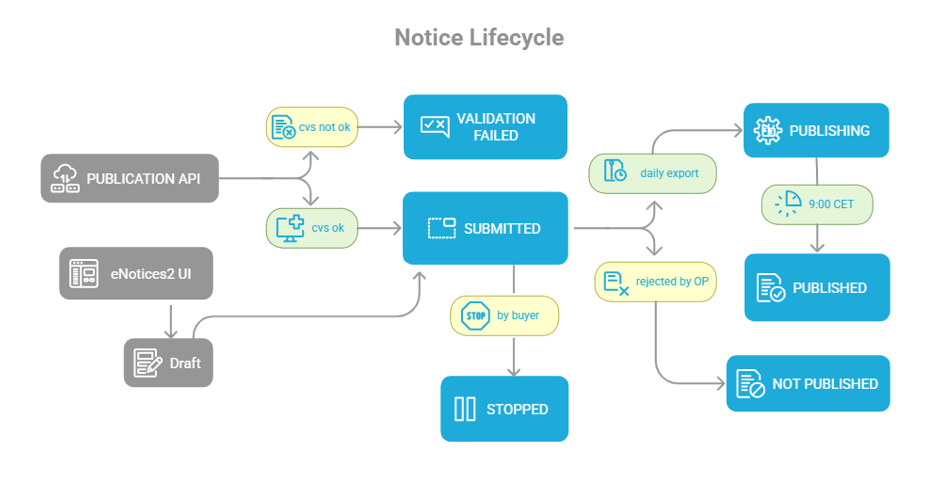
At a glance: Submit notice → CVS validation → Submitted → Publishing → Published / Not published
The lifecycle of a notice submitted via the Publication API starts with an API action and progresses through a small number of system-managed statuses, including outcomes resulting from manual checks performed by OP.
-
Submit notice (API action)
-
An eSender submits a notice using the Submit Notices for Publication API operation (Submit XML notice).
-
-
CVS validation
-
Upon submission, the notice is automatically validated by the TED Central Validation Service (CVS).
-
The CVS endpoint can be called separately at any time before submission to verify validation (both warnings and errors).
-
-
Validation outcome
-
If CVS reports errors, validation fails and the notice reaches the final status VALIDATION_FAILED.
-
If CVS validation passes (including warnings), the notice reaches status SUBMITTED.
-
-
Submitted
-
Once a notice is in status SUBMITTED, it is eligible for publication.
-
This is the only stage in which the buyer or eSender system can still stop the publication.
If the notice contains warnings, it may be checked manually by an OP operator, who will decide whether to accept or reject the notice.
-
-
Publishing (point of no return)
-
When the notice is selected for export to the Official Journal, its status changes to PUBLISHING.
-
From this point onwards, the notice can no longer be stopped.
-
-
Final outcome
-
PUBLISHED – the notice is published on TED.
-
NOT_PUBLISHED – the notice is not published on TED, for example following manual checks by OP, workflow errors, or exceptional technical failures.
-
|
|
Business ID reuse rules
Whether a notice ID can be reused depends on the status reached in the lifecycle.
-
If a notice reaches status SUBMITTED, PUBLISHING or PUBLISHED, the notice ID cannot be reused.
-
If a notice reaches status STOPPED, VALIDATION_FAILED or NOT_PUBLISHED, the notice ID may be reused, provided that the version ID is increased.
Reusing a notice ID with an increased version ID results in a new Business ID (businessID) (notice ID + new version ID).
Available Operations
Query Submitted Notices
This operation enables users to query the status and details of their TED notices. API users can access a paginated list of all their submitted notices, which they can filter and sort based on relevant criteria. Access is exclusive to the user’s own submissions, requiring an API key. Additionally, this operation facilitates the synchronisation of important metadata, such as publication status, during the notice management process.
Swagger API Endpoints
-
Preview Environment: Access the Swagger API Interface
-
Production Environment: Access the Swagger API Interface
Stop Publication
This API operation enables users to stop the publication process for a notice they have submitted. This action must be taken before the notice is exported to TED, as the publication process becomes irreversible at that point. Halting a notice in time prevents it from being published, offering control over the publication timeline. Once a notice reaches the "publishing" status, it cannot be stopped.
Swagger API Endpoints
-
Preview Environment: Access the Swagger API Interface
-
Production Environment: Access the Swagger API Interface
Retrieve Validation Report
Every submitted eForms notice undergoes a validation process to ensure compliance with regulatory business rules; this results in a report even if the notice does not pass validation successfully. This API operation enables users to obtain the validation report generated during their notice submission. It ensures users can review and address any validation issues identified during the submission.
Swagger API Endpoints
-
Preview Environment: Access the Swagger API Interface
-
Production Environment: Access the Swagger API Interface
Submit Notices for Publication
This API operation enables users to programmatically submit new notices in XML format for publication. The notice must have a unique identifier and meet specific requirements, such as including a valid notice author email and the preferred language for notifications. The email identifies the responsible party, such as the Contracting Authority, and the language must be an official EU language. Upon submission, the notice is validated against a set of business rules. If it successfully passes, it is marked "SUBMITTED" and becomes eligible for publication. If it fails, it is marked "VALIDATION_FAILED" and cannot be published.
| Please be aware that in TED API v3, the mandatory property "noticeAuthorLocale" in the metadata has been replaced by "noticeAuthorLang." Both properties will be accepted during the transition period to v3, but we recommend making the change as soon as possible. |
Swagger API Endpoints
-
Preview Environment: Access the Swagger API Interface
-
Production Environment: Access the Swagger API Interface